
If you manage local SEO for service-area businesses, you’ve almost certainly encountered this scenario: a client has created a location page for every town, suburb, and village they serve, and Google Search Console shows dozens — sometimes hundreds — of those pages sitting in “Crawled – currently not indexed.”
The client asks you: Is this a technical issue? Should I request indexing? Do I need more backlinks?
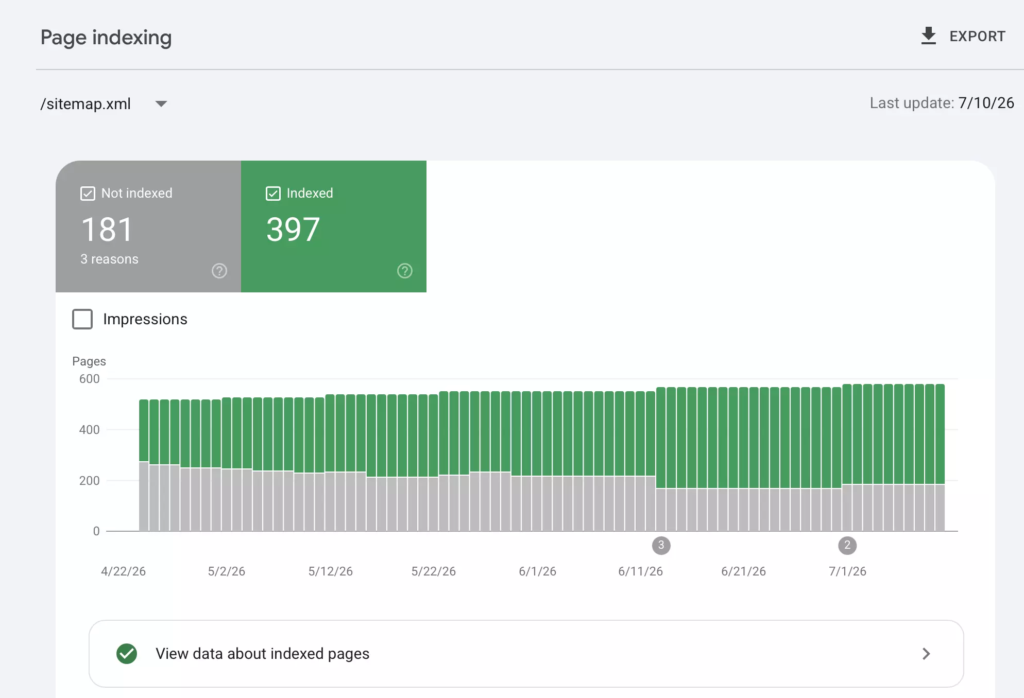
The answer, in most cases, is none of those things. Google looked at those pages and made a deliberate decision not to index them. And once you inspect the actual page content, the reason is usually obvious within 30 seconds.
This article breaks down the diagnostic process, explains why this happens at the systems level, and provides a practical consolidation framework you can apply to any service-area client.
What the GSC Statuses Actually Mean
Before diagnosing anything, make sure you’re reading the GSC Page Indexing report correctly. These two statuses get confused constantly, and they signal very different things.
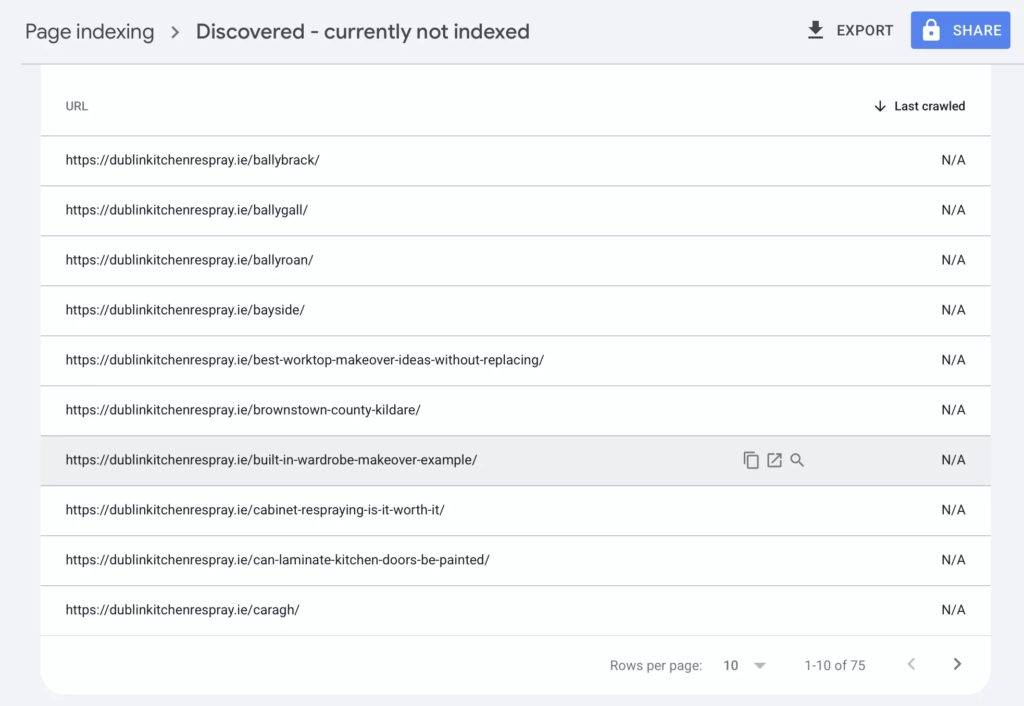
“Discovered – currently not indexed” means Google found the URL — through the sitemap, internal links, or external references — but has not crawled it yet. The “Last crawled” column shows N/A. Google knows the page exists but hasn’t allocated crawl resources to visit it.
When a handful of pages sit in this status, it’s usually normal crawl scheduling. But when 50 or 100+ location pages are all parked here with N/A crawl dates, it’s a prioritization signal. Google’s crawler is looking at your site, seeing what the crawled pages contain, and deciding the remaining pages probably aren’t worth the resources.
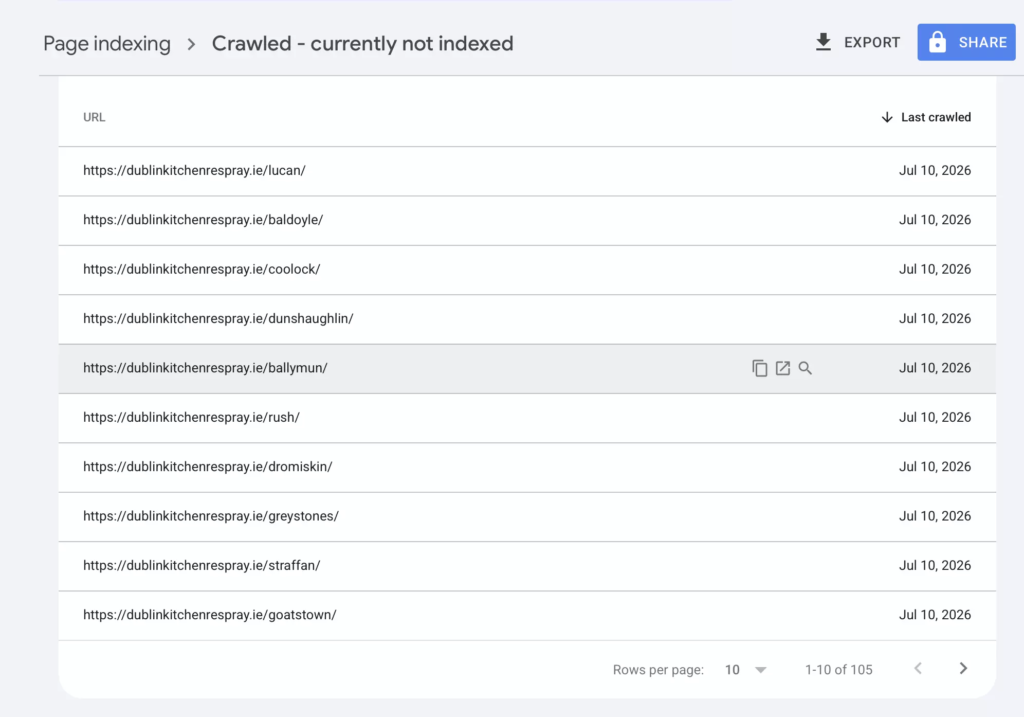
“Crawled – currently not indexed” is the more telling status. This means Googlebot visited the page, downloaded the HTML, evaluated the content — and chose not to add it to the search index. The crawl dates confirm this. If you see recent dates (within the last few weeks), Google has fresh data and is still saying no.
This is not a bug. It is not a crawl issue. It is a quality decision made after evaluation.
Understanding this distinction is critical because it changes the remediation strategy entirely. You don’t fix a quality decision with technical SEO tactics like requesting indexing or adding internal links. You fix it by changing what Google finds when it crawls the page.
The Pattern: What I Found on a Real Client Site
On a recent audit, a home services company in Dublin had over 100 location pages — one for every town and suburb in their service area. Their GSC Page Indexing report showed 105 pages in “Crawled – currently not indexed” with July 2026 crawl dates, plus additional pages in “Discovered – currently not indexed” with N/A crawl dates.
When I inspected the actual pages, the diagnosis took less than a minute.
Every location page followed an identical template. The H1 on the Lucan page read “Revamp Your Lucan Kitchen – Stunning Results Without the Hassle.” The Ballyfermot page: “Revamp Your Ballyfermot Kitchen – Stunning Results Without the Hassle.” And so on across 100+ pages.
Same body paragraphs. Same FAQ questions with the same answers. Same “Why Choose Us” section. Same images. Same OG image meta tag. The only variable was the town name, find-and-replaced throughout.
Every page was published on the same day — confirming mass generation in a single session.
This is not an edge case. I see this exact pattern across plumbers, electricians, cleaning services, roofers, and every other service-area business type. The specifics change, but the template structure is always the same.
Why Google Catches This: The Doorway Page Framework
Google’s Spam Policies page published under Google Search Central documentation explicitly defines “doorway abuse” as including “having multiple domain names or pages targeted at specific regions or cities that funnel users to one page.”
That description maps precisely to what template location pages do. A user in Lucan and a user in Malahide encounter the same content, the same offer, the same contact details, and the same business address. The pages exist to capture location-modified search queries, not to serve the user differently based on their location.
Google has been algorithmically targeting this pattern since the March 2015 Doorway Page Update. SpamBrain and the Helpful Content system have since expanded Google’s ability to detect these patterns at the semantic level — meaning they don’t just compare text strings, they evaluate meaning and information structure.
This matters because of the next objection you’ll hear from clients and agencies.
Why AI-Rewritten Location Pages Still Fail
The increasingly common response to the template problem is: “We’ll use AI to rewrite each page so the content is unique.”
On a surface level, this works. The paragraphs read differently. The sentence structures vary. A plagiarism checker finds no duplication.
But the semantic structure remains identical. Every page answers the same questions, follows the same section layout, delivers the same information, and provides the same user experience. The content architecture is a template — the words are just rearranged.
Google’s systems evaluate meaning and information gain, not just surface-level text comparison. If 100 pages all communicate the same message with slightly different wording, Google treats them functionally the same. And it’s right to do so — because the user experience IS the same, regardless of which page they land on.
The doorway test is simple: Would a user landing on THIS page get a meaningfully different experience than landing on any of the other 99? If you removed the town name from the content entirely, could you tell which location the page was for?
If the answer is no, the page is a doorway page in practice, even if the text is technically “unique.”
The Diagnostic Checklist
When you encounter mass location pages stuck in “Crawled – currently not indexed,” run through this checklist before prescribing any fix.
Check 1: Compare two or more location pages side by side. Open them in adjacent tabs. Are the section headings functionally identical? Are the paragraphs saying the same thing with different words? Are the images the same?
Check 2: Check the publication dates. If every location page was published on the same day (or within the same week), they were mass-generated. This doesn’t automatically make them bad, but it’s a strong signal that content differentiation wasn’t a priority.
Check 3: Apply the name-removal test. Mentally strip the location name from each page. Can you still tell which town or area the page is about from the remaining content? If not, there’s no genuine local differentiation.
Check 4: Check for local proof. Does each page contain anything location-specific beyond the town name? Real project photos from that area? Testimonials mentioning the neighborhood? Case studies? Area-specific pricing or service details? Travel time estimates?
Check 5: Count the ratio. How many location pages exist versus how many physical locations the business operates from? A single-location business with 200 location pages is a much stronger doorway signal than a business with 10 branches and 10 location pages.
The Consolidation Framework
Once you’ve confirmed the diagnosis, here’s the framework I use with clients.
Tier 1: The Service Areas Hub. Replace 80% of your location pages with a single, comprehensive service areas page. This page should include an interactive map showing coverage boundaries, a clear list of served areas grouped by zone or region, the business’s physical location and travel radius, and a prominent contact form or booking tool. This one page can effectively target “[service] [city]” and related queries while providing genuine value that a template page never will.
Tier 2: Standalone Location Pages (Earned). Only create a separate location page for an area where you can populate it with genuinely unique content. That means completed project photos from jobs in that specific area, local customer testimonials that reference the neighborhood by name, a case study with before/after details, area-specific information such as common housing types, typical project scopes, local pricing factors, or seasonal considerations. A location page has to earn its right to exist by providing content the other pages don’t have. If you can’t fill it with local proof, it shouldn’t be a standalone page.
Tier 3: Content Pruning. For all template location pages that don’t qualify for Tier 2, you have two options. You can either redirect them to the service areas hub page with 301 redirects, or you can noindex them if they serve an internal navigation purpose but shouldn’t appear in search results. Do not simply delete them without redirects — they may have accrued some backlinks or internal link equity worth preserving.
The Crawl Budget Argument
There’s a secondary benefit to consolidation that resonates with technical SEO stakeholders: crawl budget efficiency.
When Google crawls 100+ template pages and indexes none of them, those crawl resources are wasted. Every request Googlebot spends on a page that will never be indexed is a request it could have spent on a service page, a blog post, a case study, or any other page that actually has a chance of ranking.
For sites with fewer than a few thousand pages, crawl budget is rarely the primary concern. But when you’re asking Google to crawl 200 location pages that it’s already decided aren’t worth indexing, you’re training the crawler to deprioritize your site’s content — and that secondary effect can impact the pages you actually care about.
Having the Client Conversation
The hardest part of this entire process is often not the diagnosis or the remediation — it’s convincing the client (or the agency that built the location pages) that fewer pages is a better strategy than more.
The “more pages equals more visibility” mindset is deeply ingrained. Clients paid for those pages. They see 200 URLs in their sitemap and feel like they’re covering every possible search query.
The reframe that works: Google could have indexed any of these pages. It chose not to. That means the current strategy is producing zero search visibility for 100+ pages. Five genuinely differentiated pages will produce more visibility than 200 pages that Google refuses to index.
You’re not asking them to do less. You’re asking them to redirect effort toward pages that Google will actually show to users.
Key Takeaways
“Crawled – currently not indexed” on location pages is almost always a quality signal, not a technical issue. Google evaluated the content and decided it doesn’t provide enough unique value to justify indexation.
Template location pages — whether generated manually, by plugins, or with AI — are functionally doorway pages when the content is interchangeable between locations.
The fix is consolidation combined with genuine local proof, not technical SEO interventions like requesting indexing, adding structured data, or building backlinks to thin pages.
Five pages with real differentiation will consistently outperform 200 template pages. Build what Google has a reason to index.