Your client’s traffic dropped. Rankings didn’t change. Before you start troubleshooting crawl issues, check what Google is actually displaying on the results page — because position tracking alone no longer tells you the full story.
The Diagnostic Gap Most SEO Reports Miss
Here’s a pattern I’m running into more frequently across client audits: organic traffic is declining, but rank trackers and SEO reporting tools show stable or even improving positions. No manual actions in GSC. No Security Issues flags. Crawl stats look normal. URL Inspection returns “Submitted and indexed” (not a crawled-not-indexed problem). Nothing is technically broken.
The root cause isn’t on the site. It’s on the SERP.
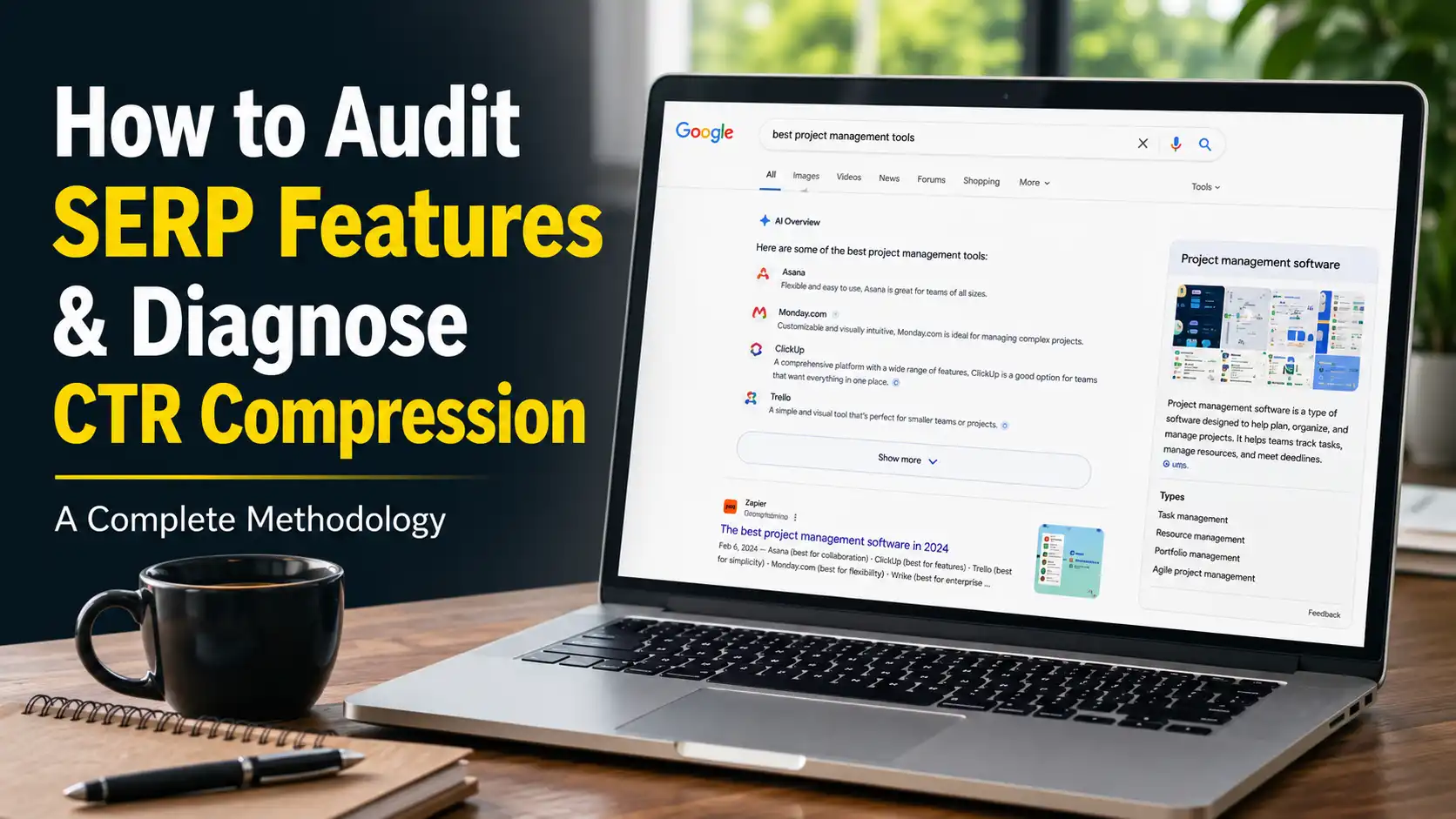
Google now displays over 37 distinct SERP feature types, according to GrowByData’s June 2026 analysis. On commercial queries, these features occupy 60 to 80 percent of above-fold real estate. The first organic result often doesn’t appear until the second or third screen of content.
If your audit methodology stops at rank position, you’re measuring a metric that no longer correlates reliably with traffic.
What Changed: AI Overviews, AI Mode, and the CTR Compression Effect
Two AI-powered features now sit between organic rankings and organic clicks.
AI Overviews are automatic AI-generated summaries that appear inline at the top of regular search results. Semrush Sensor data from March 2026 shows AI Overviews appearing in more than 30 percent of searches. Multiple studies converge on the CTR impact: position one drops from roughly 31.7 percent to about 19.8 percent when an AI Overview is present — a 37.5 percent relative decline for the top organic result, according to data from Ahrefs and Digital Applied.
AI Mode is a separate conversational search experience inside Google, powered by Gemini 3.5 Flash since May 2026. It launched in March 2025, expanded to US users by May 2025, and now has over 1 billion monthly users across nearly 200 countries. The zero-click rate inside AI Mode is 93 percent — only about 7 out of every 100 AI Mode searches produce a click to any website.
A January 2026 update connected the two: users can now ask a follow-up question directly from an AI Overview and transition into a full AI Mode conversation, with context carried forward. This creates a pipeline where users enter through modified search and exit through a fully AI-native experience — without ever clicking an organic result.
The combined effect is what I’m calling CTR compression: same ranking position, structurally lower click opportunity. And it’s measurable in GSC data — impressions hold steady or rise while clicks decline. If you’re unfamiliar with diagnosing GSC anomalies, our guide to Google Search Console issues covers the fundamentals.
How to Spot CTR Compression in Google Search Console
Before mapping SERP features manually — and before assuming the problem is one of the technical SEO mistakes that quietly kill rankings — check whether CTR compression is actually affecting your site. Open GSC’s Search Analytics (Performance > Search Results) and compare the last 6 months against the prior 6 months. Filter by page or query group and look for this specific pattern:
- Impressions stable or increasing
- Average position stable or improving
- Clicks declining
- CTR declining
If you see impressions and position holding while clicks and CTR drop, that’s the CTR compression signal. The ranking didn’t change. The click opportunity behind it did.
Export this data and segment by query intent — informational, commercial, transactional, navigational. The impact is not uniform. Informational queries have a 74 percent zero-click rate in 2026. Transactional queries sit at roughly 31 percent. If your traffic loss concentrates on informational content, that’s a strong indicator that SERP feature expansion — not a ranking or content problem — is the cause.
SERP Feature Audit Methodology: Step by Step
Once you’ve confirmed CTR compression in GSC data, the next step is mapping exactly what Google is displaying for each affected keyword. Here’s the process I use across client audits.
Step 1: Build Your Keyword Set
Pull the top 20–50 keywords by impressions from GSC that show the CTR compression pattern (impressions stable, clicks declining). These are your diagnostic priority — not your highest-volume keywords, but the ones actively losing click share.
Step 2: Map SERP Features Per Keyword
For each keyword, search in an incognito browser (logged out, VPN to the target market if needed) and document every SERP feature present:
- AI Overview — Is it present? Does it fully answer the query or partially? Does it cite any specific sources? Are you cited?
- AI Mode availability — Can the user enter AI Mode from this SERP? (Look for the AI Mode toggle or the follow-up question prompt under AI Overviews)
- Shopping / Product results — Above or alongside organic?
- Video results — YouTube or embedded? How many? Above the fold?
- Local Pack — 3-pack or expanded? Map present? (For clients with local SEO goals, this feature often matters more than organic position.)
- Featured Snippet — Paragraph, list, or table? Who owns it?
- People Also Ask — How many questions? Do they expand above organic results?
- Discussions / Forums — Reddit, Quora, or other forums surfaced?
- Image Pack — Position on page?
- Top Stories — News carousel present?
- Knowledge Panel — Right rail or main column?
- Ads — How many above organic? Shopping ads?
- Sitelinks — Expanding any competitor’s real estate?
Step 3: Measure Organic Visibility Depth
For each keyword, note the pixel depth (or approximate scroll count) before the first organic result appears. On a standard 1080p viewport, each “fold” is roughly 900 pixels. If the first organic result appears at the 2nd or 3rd fold, the realistic click opportunity is substantially lower than the position number suggests.
Step 4: Calculate Realistic Click Opportunity
Cross-reference the SERP feature map with published CTR benchmarks:
- No SERP features above organic: Position 1 CTR approximately 31.7%
- AI Overview present: Position 1 CTR drops to approximately 19.8%
- AI Overview + Shopping + Videos: Position 1 CTR likely below 15% (based on cumulative feature compression data from Seer Interactive and Ahrefs)
- Featured Snippet present (and you don’t own it): Your effective position shifts down one
This gives you an estimated click opportunity per keyword — a metric that’s far more useful than raw position for forecasting traffic and prioritizing optimization work.
Step 5: Classify Keywords by SERP Opportunity Type
Based on your mapping, each keyword falls into one of these categories:
- Clean SERP — Minimal features above organic. Traditional SEO strategy applies. Protect and improve position.
- Feature-dominated, winnable — SERP features present, but you can compete for them (Featured Snippet, PAA, Video, Discussion, AI Overview citation). Shift strategy from position improvement to feature targeting.
- Feature-dominated, low opportunity — AI Overview fully answers the query, Shopping dominates, or AI Mode is the primary experience. Organic click opportunity is structurally low regardless of position. Consider whether this keyword is still worth targeting for clicks, or whether it’s a brand visibility / AI citation play.
- Feature shift opportunity — Google shows videos or discussions but your content is text-only. Format mismatch is the blocker, not authority or relevance.
Strategy Shifts Based on Audit Findings
Once you’ve classified your keyword set, the optimization strategy changes per category.
For clean SERPs: Continue standard on-page and authority-building work. These are your highest-value keywords per position gained.
For feature-dominated, winnable SERPs: Target the features directly. Start by building a SERP-aware content brief for each keyword. If an AI Overview cites competitors, analyze what those cited pages have in common — passage-level specificity, structured data, topical authority. If Google shows videos, produce video content for those queries. If Discussions appear, ensure genuine, helpful contributions exist on the relevant forums. Brands cited in AI Overviews see significantly more organic clicks than uncited competitors on the same query.
For low-opportunity SERPs: Reassess the keyword’s role in your strategy. It may still serve brand awareness or AI citation goals, but expecting organic click traffic from it is no longer realistic. Reallocate link-building and content investment toward keywords with cleaner SERPs.
For format mismatch: This is often the lowest-effort, highest-impact fix. If Google is showing videos for a query where you only have text content, creating a video targets a SERP feature slot with less competition than the organic listing.
The Nuance That Matters
Total Google search volume hit an all-time high in the quarter before I/O 2026, according to Google’s own reporting. Organic search still delivers the highest ROI of any marketing channel for most businesses, per Search Engine Journal’s 2025 survey of SEO professionals.
CTR compression is real, but it’s not “SEO is dead.” The total search pie is growing. The click share per organic position is shrinking. The practitioners who adapt — by auditing what Google actually displays and targeting the right SERP features — will capture more of the remaining click opportunity than those who keep optimizing for position alone.
The audit methodology above is how I approach this for every client engagement now. You can see how this kind of diagnostic work plays out in practice across our case studies. Position tracking remains useful as one input. But without SERP feature mapping alongside it, you’re flying half-blind.
If you need help diagnosing a traffic decline that rankings can’t explain, our technical SEO services include full SERP feature audits as part of every engagement.