Most people think Google only indexes web pages. It doesn’t. Google reads the content inside your files too, and that single gap decides whether an old PDF quietly pulls in traffic or quietly competes with your money pages.
If you run a WordPress site, a Shopify store, or a document-heavy resource library, this matters more than you think. Every file you upload is a candidate for the index. Some of them are ranking right now for terms you never optimized for, and you have probably never looked.
Here is the full picture, straight from Google’s own documentation, plus what to actually do about it.
How Google decides a file’s type
Before the list, one detail most people miss. Google does not go by the file extension first. It reads the Content-Type HTTP header returned when it crawls the file. The extension and re-parsing are only fallbacks used when that header is missing or wrong.
That is a real technical SEO lever. If your server sends the wrong Content-Type for a file, Google can misclassify it, parse it with the wrong parser, or fail to extract the text. A misconfigured header is enough to keep a perfectly good document out of the index.
The flat file types Google indexes
These are plain text files where the content sits in readable form, sometimes with markup:
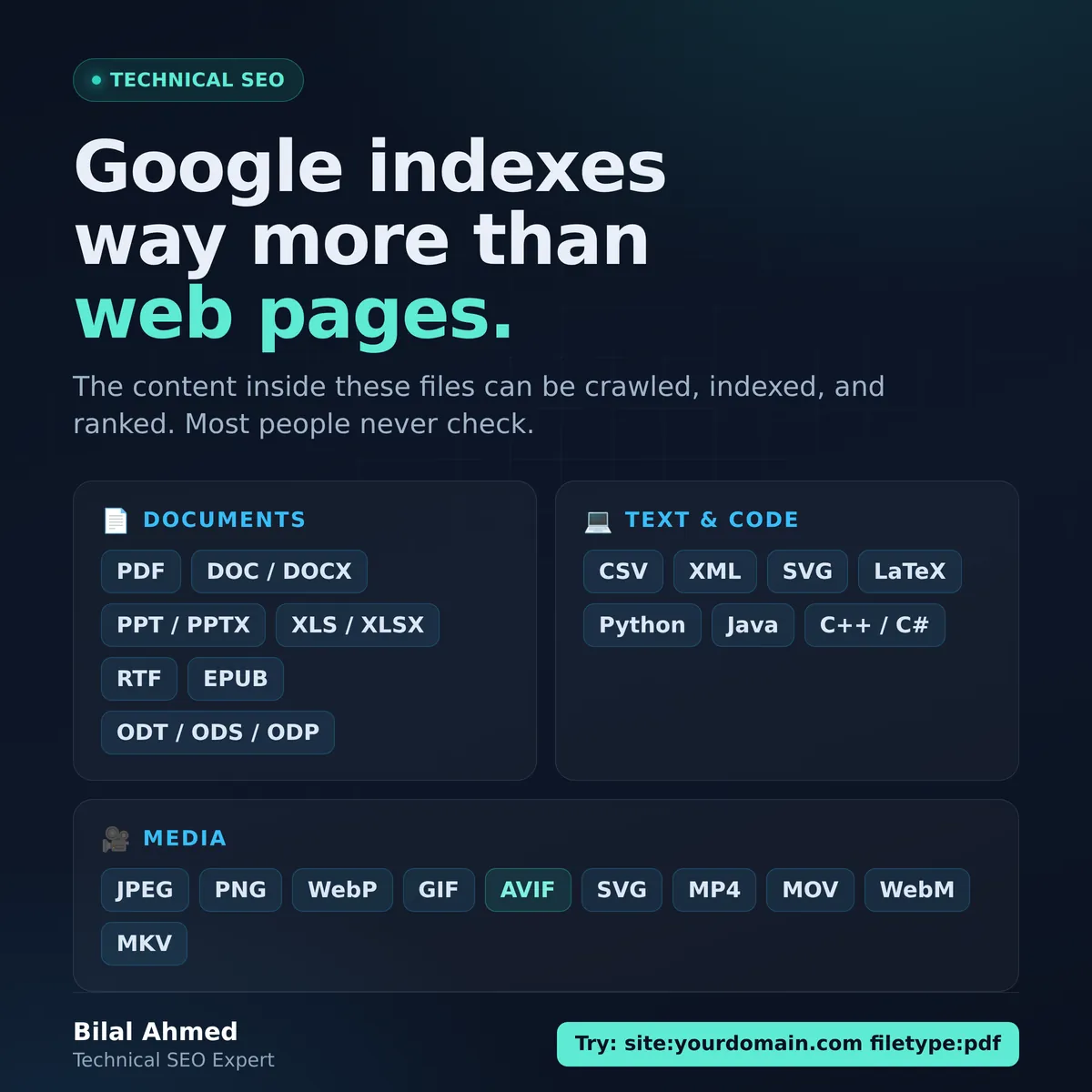
CSV, HTML, XML, SVG, TeX/LaTeX, plain text, Google Earth (KML, KMZ), GPS eXchange (GPX), and Wireless Markup Language (WML, WAP).
It goes further than that. Google also indexes raw source code as text, including Basic, C and C++, C#, Java, Perl, and Python files. Yes, your exposed .py file can end up in the index.
The encoded file types Google indexes
These are binary files and containers that need a specific parser to pull the text out. This is the group that catches most site owners off guard:
PDF, Adobe PostScript (PS), EPUB, Hancom Hanword (HWP), Microsoft Word (DOC, DOCX), Microsoft Excel (XLS, XLSX), Microsoft PowerPoint (PPT, PPTX), Rich Text Format (RTF), and the full OpenOffice family (ODT, ODS, ODP).
Think about what that means. That price list PDF in an uploads folder, the old whitepaper nobody linked internally, the spreadsheet you shared once and forgot, they are all readable by Google and eligible to rank.
The media formats Google indexes
Images: BMP, GIF, JPEG, PNG, WebP, SVG, and AVIF.
Video: 3GP, 3G2, ASF, AVI, DivX, M2V, M3U, M3U8, M4V, MKV, MOV, MP4, MPEG, OGV, QVT, RAM, RM, VOB, WebM, WMV, and XAP.
AVIF sitting in that image list is worth noting. It is one of the newer formats on the roster, so serving next-gen images does not put you outside what Google can process. Image indexing is also why your image alt text and file practices do real work, not decorative work.
Why this is a double edged sword
Indexable files are an asset and a liability at the same time.
On the liability side, orphaned files compete with your own pages. A stray PDF can rank for a query your carefully optimized landing page should own, split your topical relevance, or surface content you never meant to make public. Worse, a document that duplicates a page’s content can muddy which URL Google treats as the answer. If you have ever wondered why the wrong URL is showing in results, an indexable file is a suspect worth checking.
On the asset side, the same files are extra entry points. A genuinely useful PDF guide, a data-rich spreadsheet, or a well-labeled diagram can capture searches your HTML pages never target. The difference between the two outcomes is whether you are managing your files on purpose or ignoring them.
How to audit your indexable files in 10 minutes
Run these checks today.
First, the search operator. Google supports a filetype: operator that limits results to a specific extension. Combine it with a site search:
site:yourdomain.com filetype:pdf
Swap pdf for docx, xlsx, ppt, or any extension above. You will almost certainly find files you forgot existed. Note which ones you want ranking and which ones you do not.
Second, check Search Console. Your indexing reports show what Google has actually processed, not what you assume it has. If files are showing up where they should not, or missing where they should be, that is where you will see it. Keep in mind that Search Console has its own reporting limits, so treat it as one signal, not the whole truth, and cross-check with the operator search above.
Third, decide and act on each file:
- Keep and improve the ones you want ranking. Give them descriptive filenames, real titles, and internal links so they are not orphaned.
- Block or remove the ones you do not. Use
noindexwhere the platform allows it,robots.txtdisallow for whole directories, or return the right status code for files that should be gone. - Fix
Content-Typeheaders on anything being misclassified.
Where this fits in your wider indexing work
File-type awareness is one layer of a healthy index. If files are the surprise you did not know about, the everyday battle is still your core pages getting crawled and kept. When a URL sticks in Crawled, currently not indexed, the fix is rarely technical, it is usually quality. When a new page will not get picked up at all, work through how to get your website indexed before assuming Google is broken.
And when the indexing picture across the whole site looks off, a structured pass through your Search Console indexing issues will separate the real errors from the normal noise. Files are simply one more thing that report is quietly counting.
The takeaway
Google indexes far more than HTML, and it reads the text inside your documents, spreadsheets, presentations, and code. That is a channel most site owners never manage. Spend ten minutes with the filetype: operator this week. You will either find an asset worth promoting or a liability worth cleaning up. Both are worth knowing.
If you would rather have someone map every indexable file on your site and tell you which ones to keep, fix, or kill, that is exactly the kind of technical SEO audit I do. Reach out through Salam Experts and we will take a look.
Related guides: fixing the Excluded by noindex tag issue, Search Console redirect issues guide and technical SEO issues checklist.