

Last updated October 20, 2026. Written by the Salam Experts technical SEO team.
For about eight weeks, the Search Console Core Web Vitals report for one of our client sites showed 65 to 75 poor mobile URLs every single day. Then we moved the site to SiteGround. By October 17, 2026, the same report showed 0 poor URLs and 81 good ones.
That result is why SiteGround is our top pick for the best hosting for Core Web Vitals on WordPress sites. This guide shows what we saw, what hosting can and cannot fix, what SiteGround costs, and when another host is the better call.
Disclosure: some provider links on this page are affiliate links. If you buy through them we may earn a commission at no extra cost to you. Our picks come from results we have measured on client sites. Prices were checked on the providers’ own pages on October 20, 2026 and change often.
- The short answer: which hosting is best for Core Web Vitals?
- What hosting can and cannot fix in Core Web Vitals
- Our result: poor to good after moving to SiteGround
- Why SiteGround works well for Core Web Vitals
- SiteGround plans and what they cost
- Where SiteGround falls short
- How to move a site without hurting your rankings
- SiteGround vs the alternatives
- Core Web Vitals hosting FAQ
The short answer: which hosting is best for Core Web Vitals?
- Most WordPress sites and agencies: SiteGround. It gave us the clearest before and after, and the pricing is predictable once you plan for renewals.
- Premium managed WordPress with a bigger budget: WP Engine. We have run client sites there and passed Core Web Vitals.
- Lowest entry price among the options we reviewed: Hostinger. We have not tested it ourselves, so treat it as a candidate to benchmark, not a recommendation.
- You have a sysadmin and want full control: a self-managed VPS such as Contabo.
What hosting can and cannot fix in Core Web Vitals
Google measures three Core Web Vitals: Largest Contentful Paint (LCP), Interaction to Next Paint (INP) and Cumulative Layout Shift (CLS). A page is “good” when it hits 2.5 seconds or less for LCP, 200 milliseconds or less for INP and 0.1 or less for CLS, measured at the 75th percentile of real visits. Those thresholds are documented on web.dev.
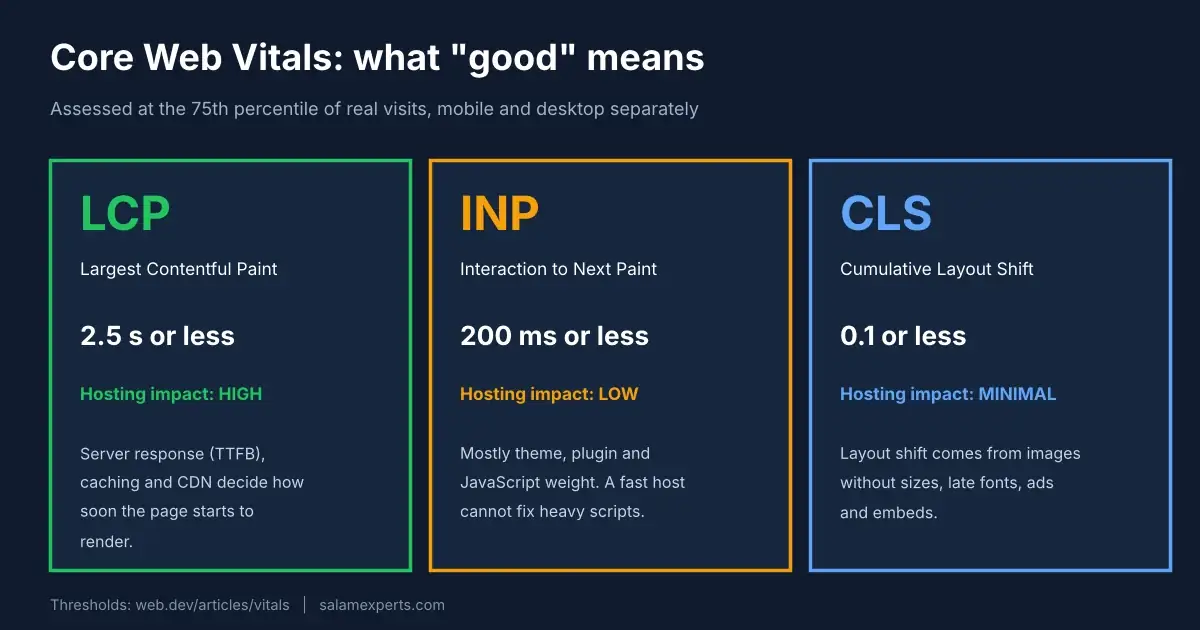
Hosting works on the loading side. Time to First Byte (TTFB) is not a Core Web Vital itself, but it comes before LCP, and web.dev’s TTFB guide explains that slow server responses push everything after them back. Server hardware, PHP version, server-side caching and a CDN all change how quickly the first byte arrives.
Hosting does not fix a 3 MB hero image, a bloated page builder, a pile of third-party scripts or ads that shove content around. Those are the usual causes of poor INP and CLS. If that is your problem, start with our Core Web Vitals optimization checklist and our WordPress speed optimization guide.
One more reality check. Google says good Core Web Vitals scores are recommended but do not guarantee top rankings, because relevance still matters most (see Google’s page experience documentation). Treat hosting as the foundation for a fast, pleasant site, not as a ranking hack.
Our result: poor to good after moving to SiteGround
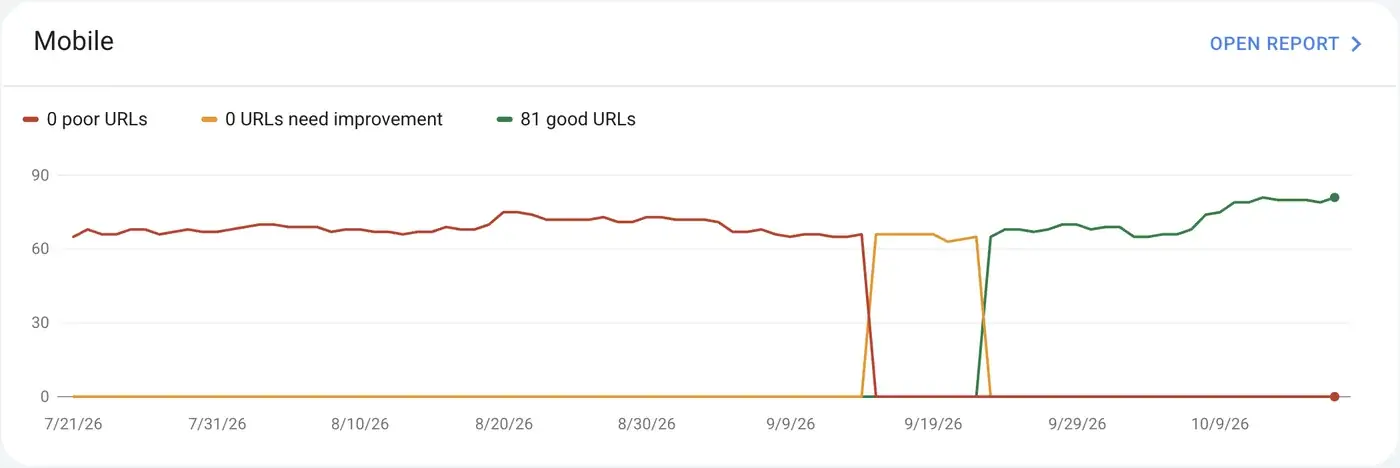
The chart shows the pattern. From July 21 until mid September, every tracked URL sat in the poor bucket. After the move the site briefly showed “needs improvement” and then settled into good, ending at 81 good URLs and none poor.
Read it with the right caution:
- Search Console uses Chrome User Experience Report field data over a rolling 28 days, so the report lags reality. Google explains this in its Core Web Vitals report help page. Give any change about four weeks before you judge it.
- This is one site, not a controlled test. A migration also resets caching and plugin settings, so we cannot credit hosting alone. We have moved several sites to SiteGround recently, and this one has the cleanest before and after record, so it is the one we show.
- The site targets visitors in Germany, so we hosted it in SiteGround’s Germany data center. Hosting near your audience matters.
Why SiteGround works well for Core Web Vitals
These are the features that matter for loading speed, taken from SiteGround’s WordPress hosting page and its Speed Optimizer plugin:
- Server-level caching on every plan. SiteGround lists multilevel caching on all plans. The Speed Optimizer plugin adds file-based caching, plus dynamic caching and Memcached object caching that work only on SiteGround hosting.
- A free CDN on all plans, which is listed alongside free SSL and backups.
- Front end tools in one plugin. Speed Optimizer can minify and combine CSS and JavaScript, defer render-blocking JavaScript, preload fonts, lazy load images and serve WebP. Dynamic caching, Memcached and image compression only work on SiteGround hosting.
- Eleven data centers on four continents, including Ashburn, Council Bluffs, Dallas, Los Angeles, London, Madrid, Eemshaven, Frankfurt, Paris, Sydney and Singapore. Pick the one closest to your visitors.
- Free site migration and staging. Migration is listed on all plans. Staging comes with GrowBig and GoGeek, which lets you test changes before they touch a live site.
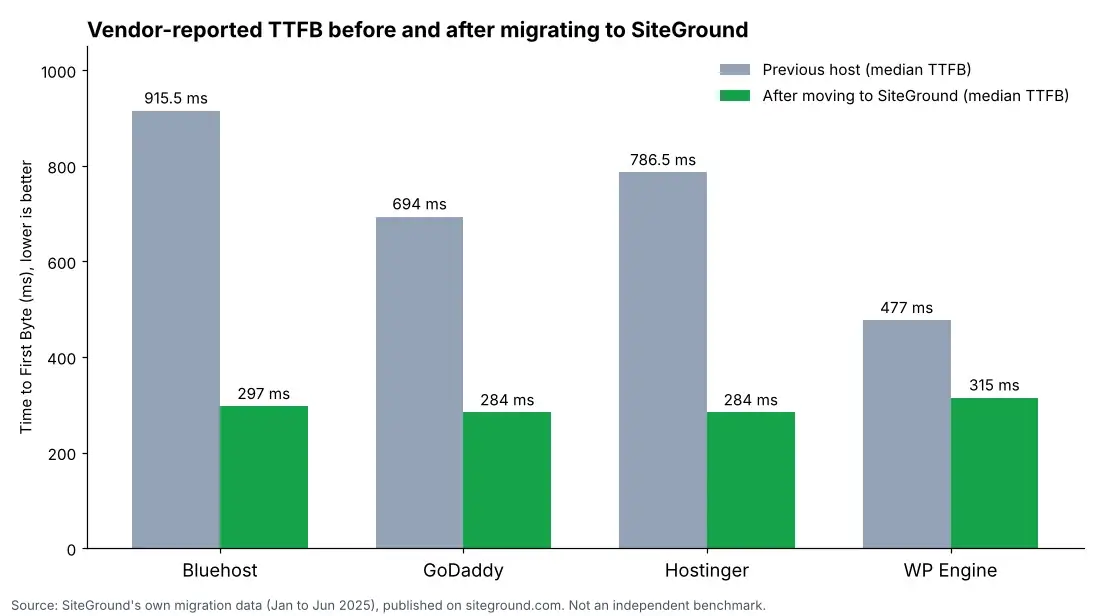
SiteGround publishes median TTFB comparisons from sites it migrated: for example 915.5 ms to 297 ms from Bluehost and 477 ms to 315 ms from WP Engine. SiteGround itself says results vary by website configuration and region and that it does not claim industry-leading speed. Use the numbers as context for our own result, not as proof.
SiteGround plans and what they cost
| Plan | Intro price | Renewal price | Sites | Storage | Staging |
|---|---|---|---|---|---|
| StartUp | $2.99/mo | $17.99/mo | 1 | 10 GB | No |
| GrowBig | $4.99/mo | $29.99/mo | Unlimited | 50 GB | Yes |
| GoGeek | $7.99/mo | $44.99/mo | Unlimited | 100 GB | Yes |
Our take: GrowBig is the plan most agencies and growing businesses need, because staging and unlimited sites matter more than the price gap. StartUp suits a single small site that rarely changes.
Where SiteGround falls short
- Renewal pricing is a big jump. GrowBig goes from $4.99 to $29.99 a month at renewal. Budget for the renewal price, not the intro price.
- It is still shared hosting. Very high traffic, heavy WooCommerce stores or sites with long database queries may need a cloud or VPS plan.
- Upsell prompts exist, and plans are billed 12 months upfront.
- Do not stack caching layers. Running a second full-page caching plugin on top of Speed Optimizer can create conflicts and confusing results. Pick one caching layer and test.
How to move a site without hurting your rankings
- Record a baseline first: PageSpeed Insights results for your key templates and the current Search Console Core Web Vitals report.
- Migrate to staging, keep every URL identical and test the main templates there.
- Pick the data center nearest your audience and set up one caching layer.
- Switch DNS, then recheck redirects, robots.txt, canonicals and the sitemap.
- Wait about four weeks and compare against your baseline in Search Console.
For the SEO side of a move, read our guide to WordPress migration SEO.
SiteGround vs the alternatives
| Provider | Best for | Starting price as listed | Core Web Vitals relevant features |
|---|---|---|---|
| SiteGround | Most WordPress sites | $2.99/mo intro, $17.99/mo renewal | Multilevel caching, free CDN, Speed Optimizer, 11 data centers |
| WP Engine | Premium managed WordPress | $28/mo billed annually | EverCache, Cloudflare-powered global CDN, staging on all plans |
| Hostinger | Tight budgets (not tested by us) | $2.49/mo on a 48-month promo term, $10.99/mo renewal | NVMe on the Unlimited plan, CDN listed |
| Contabo VPS | Teams with a sysadmin | See Contabo’s pricing page | NVMe storage, multiple locations, full root access |
WP Engine: our experience
WP Engine is managed WordPress hosting built around its own caching (EverCache), a Cloudflare-powered CDN and staging on every plan. We have hosted client sites there and passed Core Web Vitals. Two things to know: WP Engine flagged extra storage use on two of our clients and prompted an upgrade, though support kept the sites running, and the price is well above shared hosting. Its backups have been reliable. A pre-launch Core Web Vitals review is only an add-on on Business and Enterprise plans.

Contabo VPS: power with homework
A self-managed VPS gives you dedicated resources, NVMe storage and a choice of location. The catch is that you run the server. Updates, security, caching and tuning are on you, and a badly tuned VPS will fail Core Web Vitals just as easily as cheap shared hosting. We only recommend it if you already have someone who administers servers.
Weighing a VPS against a VDS? Our guide to VPS vs VDS for WordPress explains what changes when you run the server yourself.
A2 Hosting and the rest
A2 Hosting’s website now redirects to hosting.com, so we removed our old A2 plan details rather than repeat claims we cannot verify today. We also dropped the Bluehost, HostGator and DreamHost write-ups from this guide because we have not benchmarked them on client sites. If you are on one of them, measure your own field data first, then decide whether a move is worth it.
Core Web Vitals hosting FAQ
Does hosting affect Core Web Vitals?
Yes, mainly LCP. Faster server responses, caching and a CDN help the page start rendering sooner. INP and CLS depend far more on your theme, plugins, scripts and images.
What is the best managed hosting provider for good Core Web Vitals?
For most WordPress sites we recommend SiteGround. If you want a premium managed platform and can pay for it, WP Engine is a strong option. Whichever you pick, verify results in Search Console field data after about four weeks.
Is SiteGround good for Core Web Vitals?
It has been for us. A client site moved from poor to good on mobile after the switch. Combine it with optimized images, a lean theme and a single caching layer for the best chance of passing.
How long until Search Console shows an improvement?
Expect up to four weeks, because the report uses 28 days of Chrome UX Report data. PageSpeed Insights shows field data for individual URLs sooner when enough visits exist.
Will a video platform hurt my Core Web Vitals?
It can. Do not store large video files on your WordPress host. Use a video platform, avoid autoplay above the fold and load the player only when a visitor clicks, so the embed does not delay LCP or add layout shift.
Can you check whether my host is the bottleneck?
Yes. Our WordPress speed optimization services start with field data and a server response review, then fix the real cause, whether that is hosting, images or scripts.
Sources
- web.dev: Web Vitals
- web.dev: Time to First Byte
- Google Search Central: Understanding page experience
- Search Console Help: Core Web Vitals report
- SiteGround WordPress hosting and Speed Optimizer plugin
- WP Engine plans, Hostinger WordPress hosting, Contabo VPS
Related guides: website speed optimization for SEO.